





APP 50% OFF
Get Exclusive Discount



Peptide tracking apps have long since moved beyond simple injection reminders. These days, most users want the whole package - protocol organization, inventory management, calculators, side-effect notes, you name it. Some apps are able to bring that (and much more) to the table - in this Pep AI review, we’ll be looking into one such app.
Pep AI is one of the better peptide tracker apps out there, particularly for those users who care about structured protocol management and keeping their peptide data organized in one place. It has many positive aspects surrounding it, and in this Pep AI app review, we’ll go over all of them to find out what’s working, what seems limited, and who the app is best for.
I’ll also be comparing it to MAX Peptide AI - an app of similar calibre, but which I also would consider to be a better alternative for people who want a more complete peptide and wellness ecosystem.
Pep AI is a solid peptide tracker for users who care about protocol organization, vial management, dose logging, reminders, and peptide calculators. It’s a good choice if you want structure, especially for multi-compound tracking, but users looking for deeper AI functionality, body composition tools, and a broader wellness ecosystem will likely need to look elsewhere. View Pep AI
Short on time? Fair enough - I’ve made a tl;dr of this Pep AI review, or rather, the most important information below:
| Platform Availability | iOS & Android |
| Peptides Supported | 75+ |
| Dose Tracking | ✅ |
| Injection / Reminder Features | ✅ |
| Side Effect Tracking | ✅ |
| Customization Level | High |
| Ease of Use | Medium |
| Pricing | Monthly - $9.99 Annual - $39.99 |
| Key Features | Peptide calculator, inventory organization, vial photos, injection site tracker, side effect logging, nutrition logging, meal scanner, sleep tracker, Pep Bot, data export. |
| Best For | Users who want structured peptide protocol organization, especially those tracking multiple compounds. |
Pep AI is an OK peptide tracking app, especially if you care mostly about protocol organization and having your peptide management tools all in one place. It’s clear that the app is trying to be more than a simple reminder tool, based on what’s out there and what’s currently listed in the app stores.
That said, while most user Pep AI reviews are more than positive, the app isn't the most comprehensive peptide and wellness tracker in every category. It appears particularly useful for people who like structure and record-keeping, but lacks some features present on apps like MAX Peptide AI, including broader body composition tracking, further health metric analysis, or a general “mega app” experience.
If you’re weighing Pep AI vs MAX Peptide AI, I’d still give the edge to the latter as the better all-rounder. MAX Peptide AI feels more complete for users who want multiple advanced features in a single ecosystem.
So - what’s Pep AI good for?
There are quite a few things to mention, but the best aspects of the app include:
Pep AI is particularly useful for people dealing with more than a simple once-a-week injection. If you're tracking multiple compounds, schedules, dosage history, and side effects, the app provides a much cleaner system than spreadsheets, calendar alerts, or the notes app on your phone.
One of the biggest strengths of the app is inventory management. According to user Pep AI reviews, the platform supports vial tracking, remaining dose estimates, reconstitution calculations, and stock alerts. It can be very convenient for users working with multiple peptides.
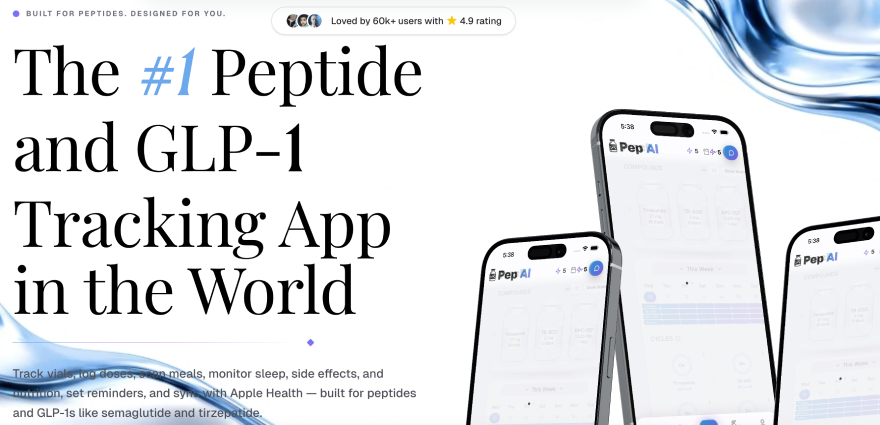
Pep AI supports custom peptides, multi-peptide tracking, different units, and features a peptide calculator. That puts it ahead of simpler GLP-1-first trackers that are focused mostly on reminders and weight management.
The app also has a clear use case for those looking for a Pep AI GLP tracker. It supports GLP-1 tracking in full, so if you’re on compounds like semaglutide or tirzepatide, this is certainly noteworthy.
I also like the side effect logging, wellness notes, AI support, and data export features that Pep AI has. While they’re not the deepest on the market, these features do offer useful context to the overall tracking experience.
Pep AI is a really strong app, but it’s not perfect. The biggest problem appears to be that some of its more general wellness and analytics features seem less fleshed out than its core tracking tools.
Pep AI seems somewhat restricted when it comes to:
To be clear, Pep AI does include a selection of wellness features. It supports side effect notes, nutrition, hydration, sleep tracking, progress photos, syncing with Apple Health, and a few more.
Depth is the issue, though. Pep AI is more of a peptide management tool than a full health optimization platform. If the main purpose is to track Pep AI peptides, manage an inventory, calculate doses, and keep records, that's just fine. For deeper analytics around body composition, recovery, training, lab work, and long-term wellness trends, there are better choices out there.
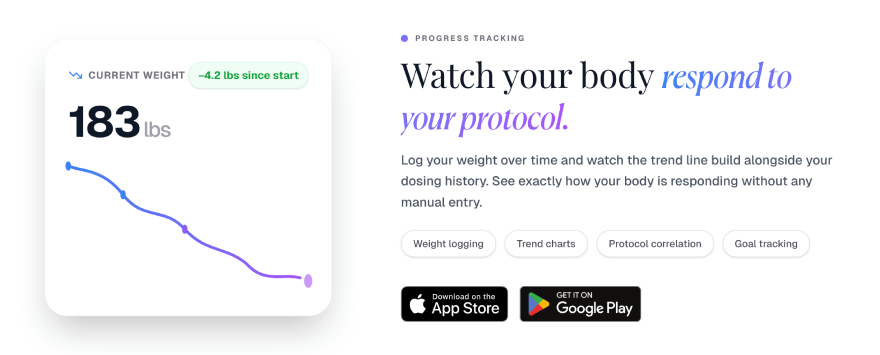
The AI side of things is very similar. Pep Bot is a nice feature, but I would not opt for Pep AI only for the AI features. The app's real value is in tracking and organization, not advanced AI-based health interpretation.
Pep AI may also feel like too much for the casual GLP-1 user. If you just want a weekly reminder and simple weight tracking, a lot of the features offered by this app may be overkill.
So, put simply, the main downside isn’t that Pep AI is bad. It’s just that its most attractive qualities are centered around organization, but the broader wellness and analytics experience feels less comprehensive.
So far in this Pep AI review, we’ve looked at the app from a more generalized approach. Now, we’ll take a bit of a closer look at each of its core features.
One of the most powerful parts of Pep AI is the inventory management system.
Users can organize their peptides, track vial info, and have more clarity on what they have available via the app. User Pep AI reviews mention features such as vial tracking, remaining dose estimates, reconstitution tools, and stock alerts.
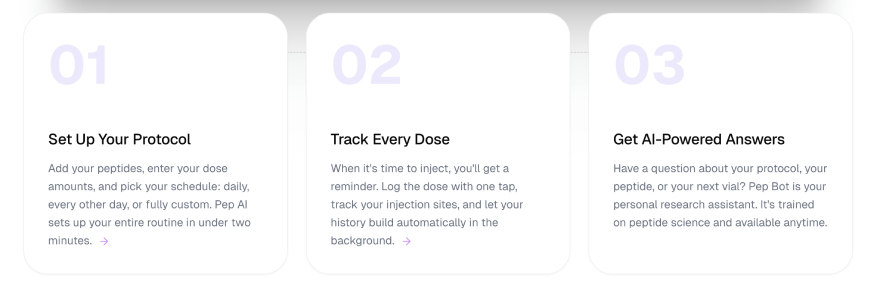
This makes it more useful than just a reminder app. If you’re working with multiple Pep AI peptides, inventory tracking might be one of the most important tools in the app.
Dose logging is the backbone of any peptide tracker, and Pep AI performs well in this category.
Users are able to record doses, keep a history of what they’ve taken, and organize their protocol over time. It supports custom peptides and multi-peptide tracking, giving it an edge over the more basic GLP-1-focused apps that are often built around single-compound routines.
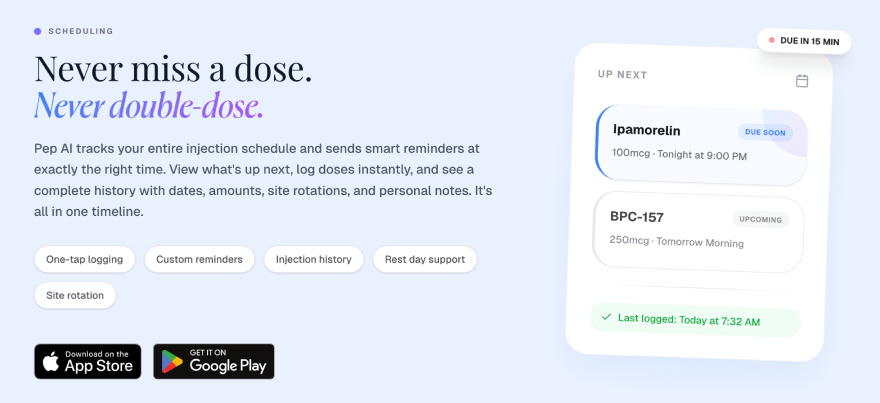
So, if you are looking into Pep AI GLP tracking, the app is still good to go.
Another significant feature is the peptide calculator.
Pep AI has a calculator and unit tracking, including common peptide units like mg, mcg, and IU. This is very useful for people who are dealing with reconstitution or trying to keep records consistent.
A calculator within an app is a convenience, not a replacement for a healthcare provider. From a tracking perspective, however, it's often more convenient to have these tools in the same app.
Pep AI also has reminder and scheduling features.
There are injection reminders, as well as custom schedule and recurring dose support. Its calendar view and missed dose logs are more limited, so I wouldn’t say it’s the strongest app in this category. But, the basic reminder system is still there, and for many users, that will be sufficient.
Another useful feature of Pep AI is side effect tracking.
Users can document side effects and track how they’re feeling over time. This can be helpful if you’re adjusting doses, changing your routine, or trying to learn how your body responds to a peptide over a longer period of time[1].
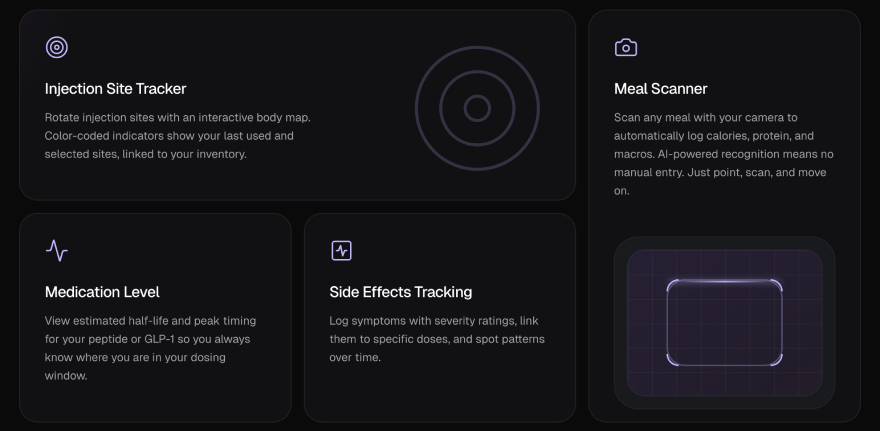
It’s worth mentioning, however, that some users report symptom tracking as somewhat limited, so I’d consider this a helpful feature rather than one of the app’s strongest tools.
Pep AI offers some more general wellness features, including nutrition, hydration, and sleep tracking.
It makes sense, as peptides are rarely used on their own. Many users are also thinking about things such as weight loss, appetite, recovery, training, and sleep quality[2]. Still, these features feel more like supporting tools than the main reason to choose Pep AI.
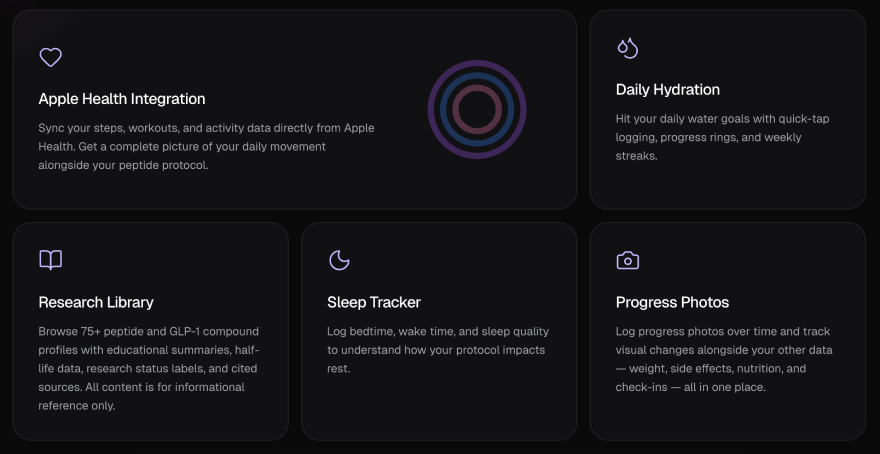
This is one of the more straightforward differences between Pep AI and apps like MAX Peptide AI. The latter focuses more on linking peptide usage to an overall wellness picture that includes body composition, nutrition, recovery, sleep, and general health metrics.
Pep AI also includes AI features, with Pep Bot being the most notable one.
This can be helpful for users who want a more interactive way of working with their data, notes, or tracking history. AI can turn an app from a static logbook to a tool that helps you understand what you’re dealing with.
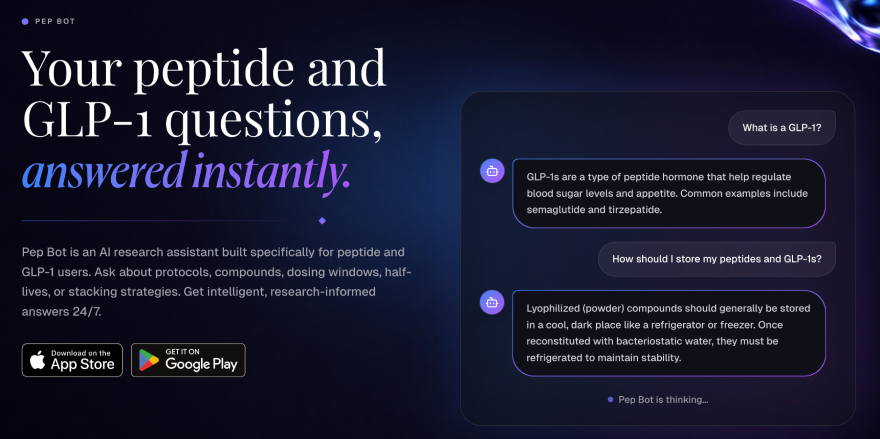
Pep Bot is essentially a chatbot that you can talk to and consult with. Obivously, it’s not a replacement for a human healthcare provider, but it’s still a convenient and useful tool in Pep AI’s roster.
Finally, Pep AI supports data exports and reporting. This is a useful feature for users who want to look back at their history, keep long-term records, or share organized information with a physician.
User Pep AI app reviews note that data exports are definitely useful. They make the app feel more serious, especially for users who care about tracking for the long haul.
Overall, Pep AI has a strong set of features. It’s going to be best for people who want to stay organized with their peptide or GLP-1 routine, especially if they care about inventory, dose history, calculators, reminders, and reports.
Now, let’s talk about Pep AI pricing.
| Period | Price |
|---|---|
| Weekly | - |
| Monthly | $9.99 |
| Annual | $39.99 |
Of course, app prices may vary by platform, region, promotions, or subscription updates. Thus, it’s always worth looking at the App Store or Google Play before signing up.
That said, the Pep AI pricing is widely considered to be quite fair. The app costs $9.99 per month or $39.99 per year - a sort of middle ground for peptide trackers. It’s not the lowest price out there, but it doesn’t feel like a rip-off for what it offers.
With the basics of Pep AI’s features, limitations, and pricing covered, let’s go over how to use the app. Rather, I’m not going to make this a full tutorial, but let’s still take a look at how you can get started.
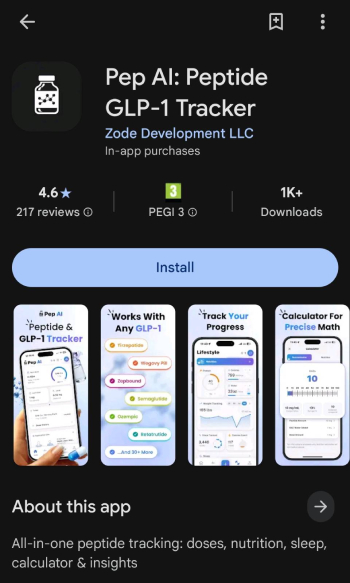
Download Pep AI from either the Apple App Store or Google Play.
Pep AI is available for both iOS and Android. So, choose your preferred platform and download the app. Once installed, open it up.
Set up your account.
Now you can start shaping the app around your actual goals. You’ll need to input your basic personal info, select what you want to track, and answer some questions in a quiz.
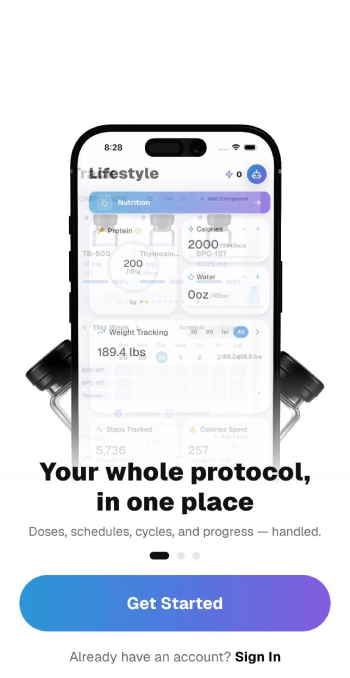
Explore the app!
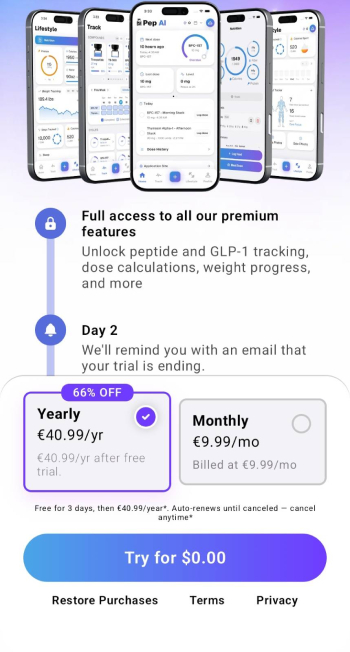
You'll need to choose a plan before continuing - the good news is that you'll get a free trial, at least as of writing this Pep AI review!
Once you enter the app proper, you can begin to build out your protocol - start tracking dose amount, creating schedules and reminders, sorting out inventory details, as well as any notes you want to keep attached to your routine.
Overall, getting started with Pep AI shouldn’t be too difficult. There are a lot of tools in the app, so it might take a bit of time to navigate around, but the general idea is simple enough - add your protocol, set your reminders, track your inventory, and log consistently.
Let’s finish off this Pep AI review by comparing the app to some of its closest alternatives.
| Pep AI | MAX Peptide AI | |
|---|---|---|
| Peptide Support | 75+ | 100+ |
| Injection / Dosing Reminders | ✅ | ✅ |
| Side Effect Tracking | ✅ | ✅ |
| AI Features | ✅ | ✅ |
| Integrations | Apple Health, Google Health, wearables | Apple Health, Google Health, wearables |
| Pricing | Monthly - $9.99 Annual - $39.99 | Weekly - $7.99 Monthly - $12.99 Annual - $49.99 |
| Best for | Structured peptide protocol organization. | People who want to track their peptide use and improve nutrition, sleep, training, and recovery. |
This is, perhaps, the most interesting comparison.
Why? Simply because MAX Peptide AI is likely the closest direct competitor to Pep AI, feature variety- and target audience-wise. Pep AI and MAX Peptide AI are designed for users who want peptide tracking, custom protocols, reminders, calculators, inventory tools, and AI-related features, all in one place.
The biggest difference between the two apps is likely their scope.
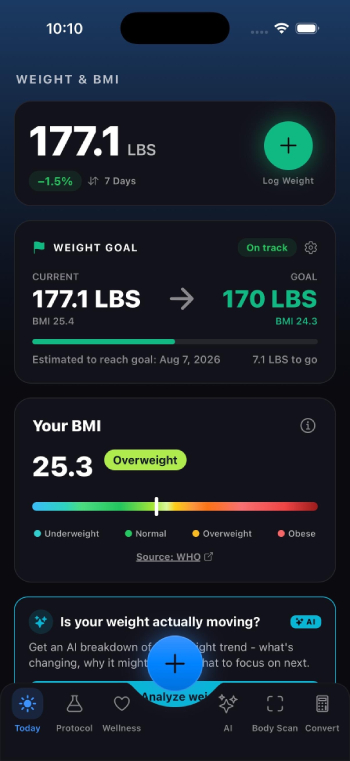
Pep AI is best as a structured peptide tracker. If you’re mostly looking for ways to organize your compounds, track your vials, log doses, and export reports, Pep AI makes a lot of sense. It gives users a cleaner system than spreadsheets or generic health trackers.
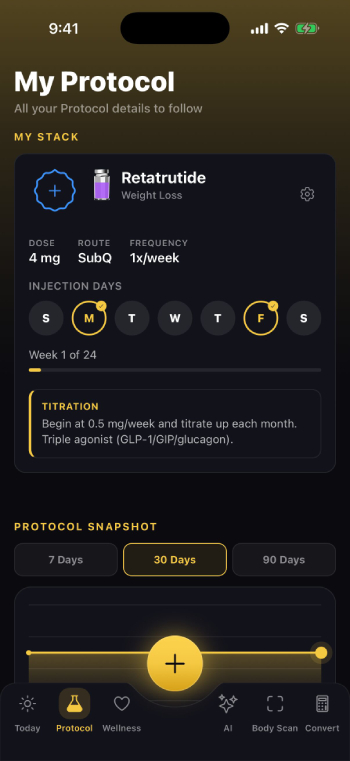
But MAX Peptide AI goes a step further. It takes peptide tracking and blends it with body composition analysis, nutrition tracking, sleep, recovery, fitness data, side effect logging, body scans, lab result analysis, and broader wellness insights.
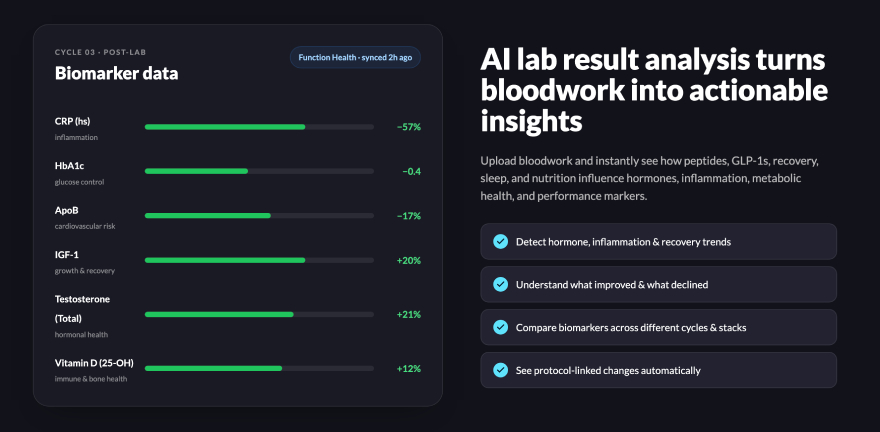
That means MAX Peptide AI feels more like a full peptide and wellness app, while Pep AI feels more like a dedicated peptide organization tool.
If your biggest concern is keeping your protocol organized, Pep AI is a decent app. If you want your peptide tracking tied into a larger health optimization system, MAX Peptide AI is the much better choice, as far as Pep AI alternatives go.
Shotsy is one of the more popular GLP-1 tracker apps.
It’s based on a simpler use case - monitoring injections, reminders, medication levels, and weight loss. That kind of targeted experience can be very appealing for someone taking semaglutide, tirzepatide or another GLP-1 compound.
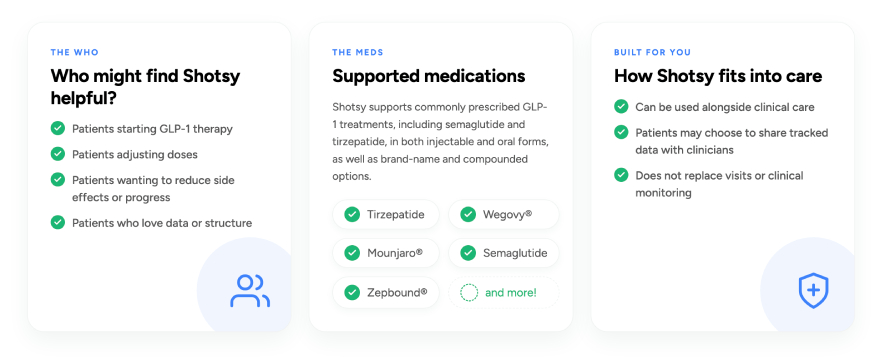
Pep AI also works for GLP-1 users, but it's clearly built with a more general peptide tracking use case in mind. So if you’re just looking for a slick GLP-1 progress tracker, Shotsy might feel easier. It’s simpler, more focused, and less likely to confuse casual users.
But if you’re tracking GLP-1s and other peptides, or you want inventory and reconstitution tools, Pep AI is the stronger pick.
MeAgain is another app that is more GLP-1 and lifestyle tracking-leaning.
It’s about weight loss, symptoms, food, protein, and habit building. It's a good fit for people who want a friendly app to assist them on their weight-loss journey, especially if they're not interested in advanced GLP-1 management.
Whereas Pep AI is less about the general lifestyle experience and more about the protocol structure, inventory, dose history, and peptide organization. It’s better for users who want to keep detailed records of their peptide use.
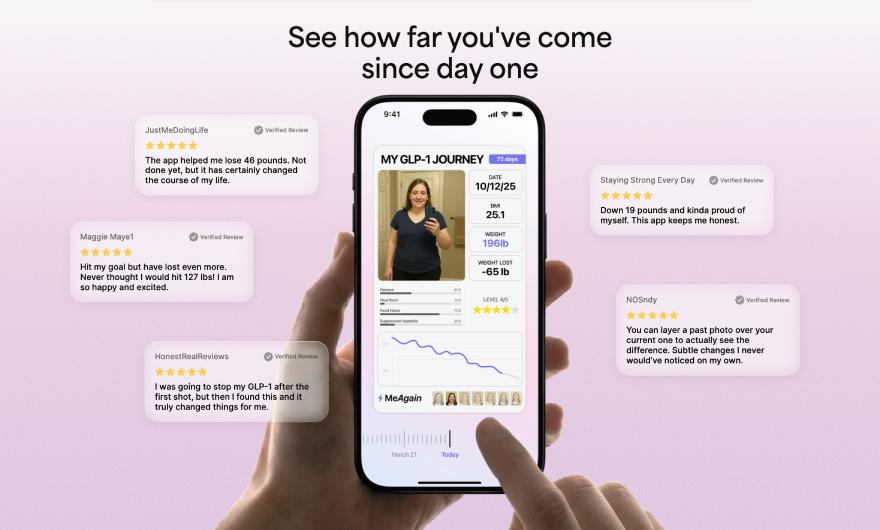
MeAgain may be somewhat more accessible to new users. Pep AI will probably appeal more to users who want control, structure and a cleaner way to manage compounds.
There’s the price angle, too. MeAgain’s annual subscription is way more expensive than Pep AI’s annual plan. So if your main focus is peptide tracking and not lifestyle coaching, Pep AI looks like the better deal.
And that's a wrap on this Pep AI review.
Overall, Pep AI is a decent peptide tracking app, especially for those who like more structure around their protocol. It’s useful for logging doses, tracking your peptide inventory, organizing vials, keeping reminders, side-effect notes, and reports.
Is it flawless? No. Some of the more general wellness and analytics features do feel a little limited, especially when compared to alternatives like MAX Peptide AI. Pep AI is probably better thought of as a focused peptide organization tool, not necessarily a full health optimization platform.
So, if you want the more complete option, I’d still go with MAX Peptide AI. It provides a broader ecosystem where peptide tracking, body composition, nutrition, sleep, recovery, lab result analysis, and more powerful AI capabilities all work in tandem.



 Verified
Yes, Pep AI appears to be a legit peptide and GLP-1 tracking platform. The app is available for Android and iOS, and comes with tools to log doses, track inventory, set reminders, calculate peptides, note side effects, and generate reports.
If you want the most comprehensive peptide and wellness platform on the market today, I’d recommend MAX Peptide AI as the better all-around option. While both apps share a lot of similarities, MAX Peptide AI offers more bang for your buck, and includes things like advanced AI functionality and broader wellness metric tracking.
Yes, “Pep AI GLP tracker” is a thing. The app supports GLP-1 compound tracking, reminders, dose history, side effect tracking, and similar features. However, for users who only need a very simple GLP-1 reminder tool, Pep AI might be more detailed than needed.
Pep AI pricing is either $9.99 per month, or $39.99 per year. Prices may differ by region, platform, promotions, or app updates, so it is always worth checking the App Store or Google Play before subscribing. Generally, it’s considered to be a fairly priced app, for what it provides.
Pep AI is going to be best for people who want a one-stop shop to organize their peptide routines. It’s especially helpful for tracking doses, managing inventory, and keeping track of side effects. Using an app like this is more reasonable than trying to track everything in spreadsheets or notes, especially if you are working with a lot of compounds.
Generally, I’d say yes - MAX Peptide AI is the better choice for the majority of people seeking a full peptide and wellness ecosystem. Pep AI is decent, but MAX Peptide AI takes it a step further by offering advanced-level peptide tracking and general wellness- / longevity-oriented features.
Join 60,000+ longevity biohackers and get our 5-min weekly read with the latest findings, research-backed protocols and tips to boost your daily habbits!
Searching for results...
Please wait while we find the resultsNo results found for ""
Try searching for a different termSomething went wrong
Please try again later